Use Jev with Cloudflare Workers AI
Understand the AI-binding route, verify model availability, and use a complete Worker-to-TypeSafe integration.
On this page
Provider status and the two pathsArchitectureNative AI binding — confirm before useCreate a Worker for the direct APIConfigure and deployProduction checks and troubleshootingProvider status and the two paths
The supplied research plan names a Workers AI model typesafe/jev. During this build, that exact model was not found in the public Cloudflare documentation we could verify, and the local account credential did not permit a model-catalog API check. Native binding availability is not confirmed here. This does not establish that the model is unavailable to every account.
A Cloudflare Worker can still call the documented TypeSafe Direct endpoint with a server-side secret. The complete example below uses that verified HTTP contract and clearly distinguishes it from native Workers AI inference.
Architecture
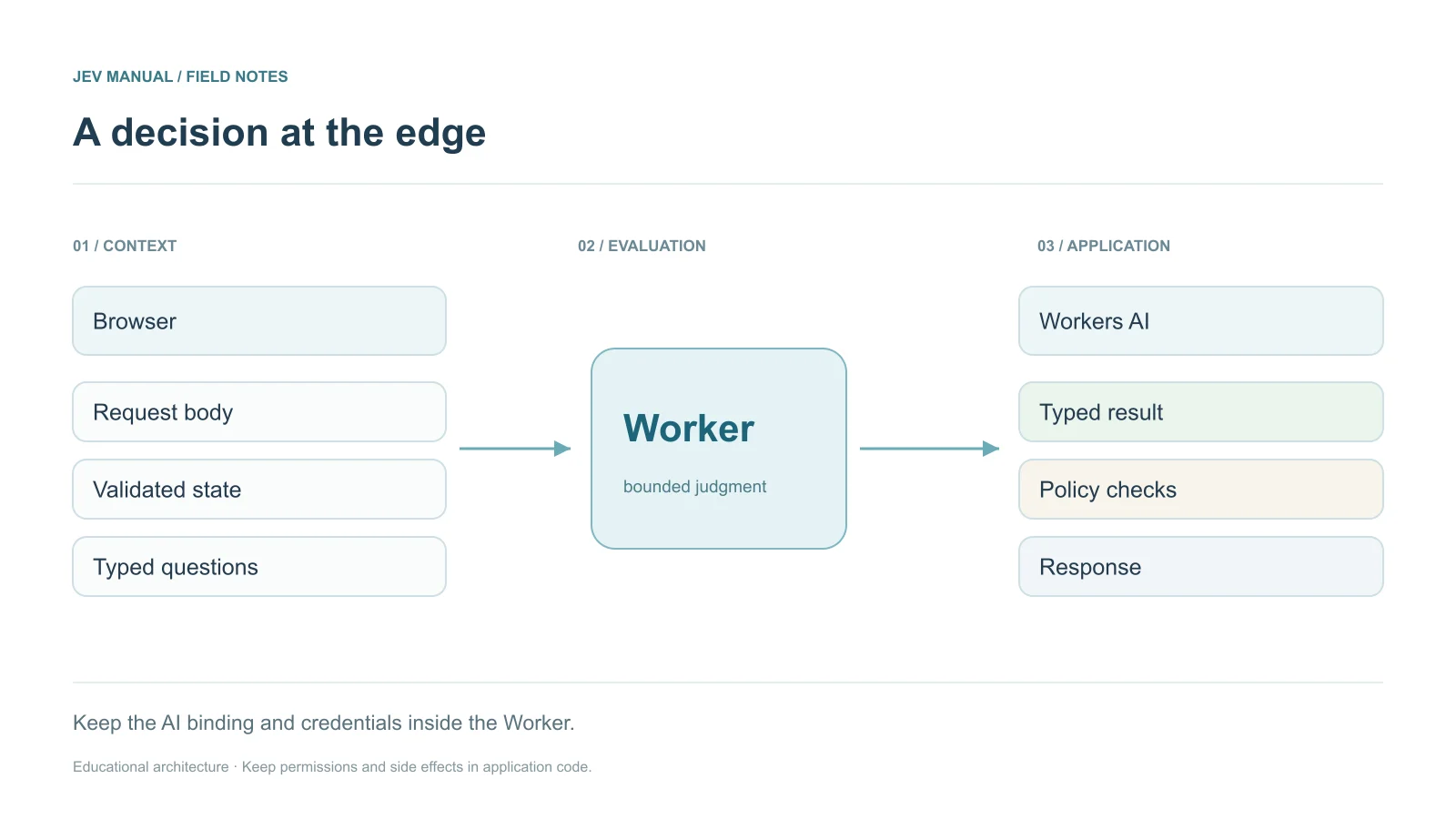
The application validates input, calls the model, checks the answer, and returns a recommendation. It does not execute a refund or tool action. Protect the paid endpoint with application authentication and a rate-limit policy.
Native AI binding — confirm before use
A Worker configuration can declare "ai": { "binding": "AI" }. Cloudflare’s native invocation form is env.AI.run(modelId, input). Before using the plan’s typesafe/jev ID, confirm the exact model ID, availability, input schema, output schema, and pricing in your Cloudflare account. Do not assume the direct API’s wrapper or model field is accepted by a binding.
{"name":"jev-triage","main":"src/index.js","compatibility_date":"2026-09-21","ai":{"binding":"AI"}}
This is binding configuration, not proof that a particular model can run. The following complete HTTP fallback needs no AI binding.
Create a Worker for the direct API
Create src/index.js and use the code below. Its APP_TOKEN is a separate application secret; it is not a substitute for user-level authorization in a multi-user product. Refine authentication and request-size enforcement for your application before exposing it to the public.
export default {
  async fetch(request, env) {
    // Protect this paid endpoint independently of the model.
    if (!env.APP_TOKEN || !env.TYPESAFE_API_KEY ||
        request.headers.get('Authorization') !== `Bearer ${env.APP_TOKEN}`) {
      return new Response('Unauthorized', { status: 401 });
    }
    if (request.method !== 'POST') return new Response('POST required', { status: 405 });
    let input;
    try {
      if (!request.body) return new Response('Body required', { status: 400 });
      const reader = request.body.getReader();
      const chunks = []; let length = 0;
      while (true) {
        const { done, value } = await reader.read();
        if (done) break;
        length += value.byteLength;
        if (length > 16000) {
          await reader.cancel();
          return new Response('Body too large', { status: 413 });
        }
        chunks.push(value);
      }
      const bytes = new Uint8Array(length); let offset = 0;
      for (const chunk of chunks) { bytes.set(chunk, offset); offset += chunk.length; }
      input = JSON.parse(new TextDecoder().decode(bytes));
    }
    catch { return new Response('Invalid JSON', { status: 400 }); }
    if (!input || typeof input.ticket !== 'string' || input.ticket.length > 10000 || !input.ticket.trim()) {
      return new Response('Provide a non-empty ticket under 10,000 characters', { status: 400 });
    }
    try {
      const upstream = await fetch('https://api.typesafe.ai/v1/systemone', {
        method: 'POST',
        signal: AbortSignal.timeout(15000),
        headers: { Authorization: `Bearer ${env.TYPESAFE_API_KEY}`, 'Content-Type': 'application/json' },
        body: JSON.stringify({
          model: 'jev-1.13.0', state: { ticket: input.ticket },
          questions: { department: { type: 'choice', instructions: 'Which team owns this ticket?',
            criteria: { billing: 'Payments and refunds', technical: 'Bugs and outages', other: 'Neither' } },
            urgency: { type: 'score', instructions: 'How urgent is this?', criteria: ['Routine', 'This week', 'Today'] },
            refund: { type: 'noul', instructions: 'Is a refund explicitly requested?' } }
        })
      });
      if (!upstream.ok) return Response.json({ route: 'review' }, { status: 502 });
      const result = await upstream.json();
      const answer = result.answers?.department;
      const allowed = ['billing', 'technical', 'other'];
      if (!answer || !allowed.includes(answer.choice) || !Number.isFinite(answer.confidence)
          || answer.confidence < 0 || answer.confidence > 1) {
        return Response.json({ route: 'review' }, { status: 502 });
      }
      return Response.json({ route: answer.confidence >= .85 ? answer.choice : 'review',
        model: result.model, executed: false }); // example threshold
    } catch {
      return Response.json({ route: 'review' }, { status: 502 });
    }
  }
};
Configure and deploy
For the direct version, use a Wrangler configuration with name, main, and compatibility date. Store secrets interactively rather than putting them in source:
npx wrangler secret put TYPESAFE_API_KEY
npx wrangler secret put APP_TOKEN
npx wrangler deploy
Download the complete Worker module. Test with an authenticated POST whose body contains a ticket string. A low-confidence answer, malformed output, timeout, or upstream error produces a review route.
Production checks and troubleshooting
The .85 threshold is illustrative. Evaluate it with labeled tickets. Enforce body limits at the application boundary, apply rate limits, and bind authorization to the actual user and resource. For a native binding error, confirm model availability before changing question text. For direct 401 or 422 responses, use the HTTP error guides.
The hosting of this manual on Cloudflare is separate from where Jev inference runs. Static Pages hosting does not imply use of Workers AI.